


Program "Mini-Furniture"
|
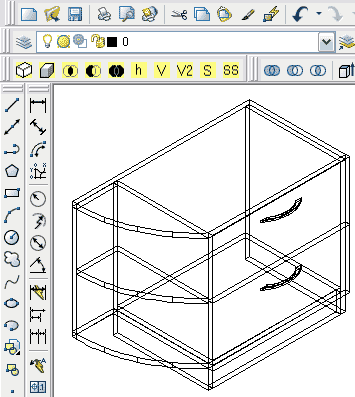
Mini-Furniture software is provided for arranging a list of flat parts of furniture designed with AutoCAD and for transmission of this list to cutting software (2D-Place, Cutting, Kuznetsov Cutting, Astra Cutting) and MS Excel. View demo film Mini-Furniture supports AutoCAD since version 2000i and higher. Mini-Furniture software requires preliminary designed 3D model of furniture, which consists of solids. (Most furniture makers usually use solid elements to design furniture with AutoCAD). Furniture model looks approximately as shown on the drawing. |
 |
When furniture model is ready, you can apply "Mini-Furniture".
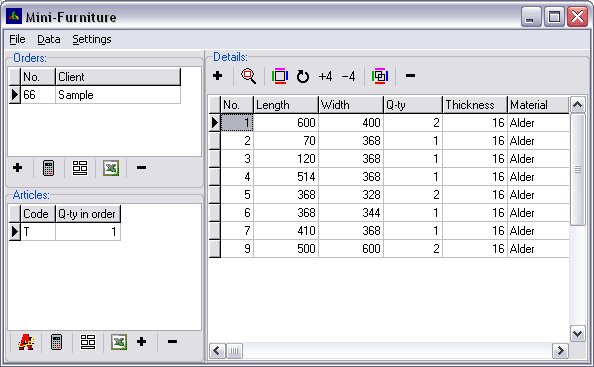
For getting the list of parts you should create order (if it is a new order), add a new item to the order. Then choose menu DATA\IMPORT FROM AUTOCAD. Mini-Furniture will arrange the list and display it in the main window of program.
During constructing the list you can (optionally) select which sides of parts are covered with bands, type of bands, the material of parts, etc. You can either choose direction of parts texture or you can trust on automatic texture detection. The rules for automatic mode:
-direction “upwards-downwards” will be set for vertical parts;
-direction “left-right” will be set for horizontal parts;
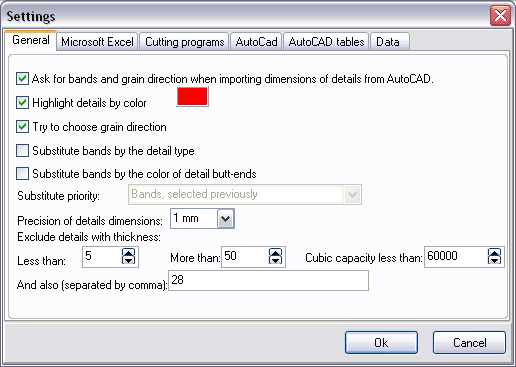
Using settings of Mini-Furniture software you can enable filters which will remove the following parts from the list:
-small parts (e.g., fixture, handles and other different accessories);
-parts of certain thickness (e.g., 28 mm for kitchenboard or 4 and 5 mm for glass).
-parts with thickness less than X and more than Y.
Parameters of filters can be set in program settings:
You can edit the list of parts received by Mini-Furniture. You can also view statistics of sheet materials and bands by orders or by items. To be not confused in parts numbers, Mini-Furniture allows highlight selected part in red color in AutoCAD.
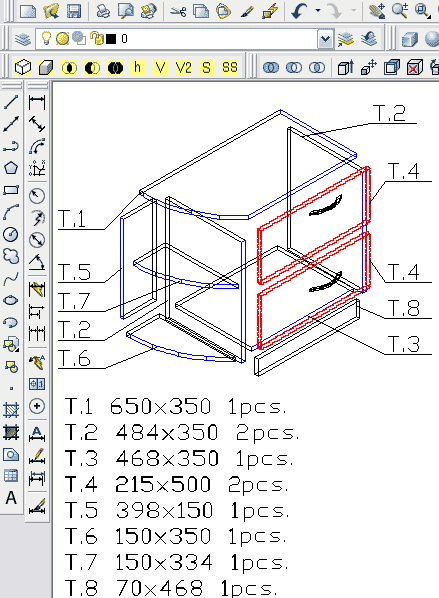
Mini-Furniture software has special features "DRAWING WIZARD" and "PUT THE LIST TO THE DRAWING" in menu "DATA", to form the special drawing of an furniture model. Each part noted with its No. and butt-ends. The list of parts also is placed on this drawing. After executing these commands we get the following sketch of furniture: